
The Hidden Secret Behind Great LLM Products
People fall in love with a demo.
A chat window answers questions, writes copy, summarizes a document, maybe even generates code. Then the product ships, real users show up, and the magic starts acting unreliable. It forgets key details. It pulls the wrong policy. It gives an answer that sounds right and is quietly wrong.
That gap has a cause. Great LLM products don't win because the model is "smarter." They win because the product wraps the model in an architecture that supplies the right information at the right moment.
The hidden secret is simple:
LLMs are stateless. Great products build state around them.
This post breaks down what that means, how "memory" is usually created, and why creative context is where mediocre apps turn into durable, high-performing systems.
1) Stateless Calls: What Your Product Has to Do That the Model Won't
When you call an LLM API, the model sees only what you send in that request. No invisible continuity. No automatic recall of earlier messages. No awareness of your documents, your CRM, your repo, or your policies.
So how does chat feel continuous?
Because the application sends context every time.
That context usually comes from three places:
- Instructions: role, rules, formatting, safety constraints, tone, and task definition
- Conversation history: full transcript or a rolling summary
- External knowledge: documents, tickets, emails, databases, files, code
The model is the reasoning engine. The product is the memory system.
2) The "Memory" People Experience Is a Design Pattern
When users say "it remembers," they're describing an experience, not a model capability. That experience is typically built from two layers.
A) Conversation Memory
This is how the app carries the thread forward.
Common approaches:
- Replay the transcript (simple, expensive, eventually noisy)
- Use rolling summaries (cheaper, more stable, requires care to prevent drift)
- Hybrid (recent messages verbatim + older content summarized)
Failure modes show up fast:
- Long threads dilute important constraints
- Old assumptions linger after they're no longer true
- The model starts optimizing for coherence over correctness
B) Knowledge Memory
This is how the app brings in facts that never belonged in chat history.
Examples:
- the latest pricing sheet
- a customer's contract terms
- a runbook for incident response
- the canonical definition of a KPI
- the actual code in a repo, not a recollection of it
This layer is where RAG, embeddings, and vector search matter.
3) RAG: Retrieval Is the Product
RAG (Retrieval Augmented Generation) sounds like a model feature. It's really an application capability:
Find the best source material for the current question, then feed it to the model as context.
This beats "just put everything in the prompt" for three reasons:
- Context windows are limited. You can't paste your company into a chat box.
- Relevance matters more than volume. Extra text adds contradictions and noise.
- Freshness matters. The most similar document is not always the newest or most authoritative.
Embeddings and Vector Search in Plain Language
Embeddings turn text into a representation that captures meaning. Vector search then finds chunks of your knowledge that are conceptually close to the user's request, even when they use different words.
This is why a user can ask:
"What's our policy on expense approvals?"
and still retrieve the right section even if the doc is titled:
"Procurement Controls: Thresholds and Approvers"
Vector search is not perfect retrieval. It's good first-pass recall. Great systems layer in ranking and rules.
4) Vectorized Summaries: How Systems Scale "Memory" Over Time
A product that only retrieves full documents often feels clunky. Users want continuity, not an encyclopedia dump.
That's where summaries do real work.
A strong pattern:
- Store event-level summaries of important moments (decisions, constraints, preferences, outcomes)
- Embed those summaries
- Retrieve them alongside raw sources when relevant
This creates a compounding effect:
- the system carries forward what mattered
- the model gets a clean, compact narrative
- new requests can be answered with both context and grounding
Practical examples:
- A support organization can store summarized "case outcomes" and "accepted fixes"
- A sales team can store summarized "buyer objections" and "commitments"
- An engineering team can store summarized "design decisions" and "tradeoffs"
The user experiences "memory," while the system remains fully explicit about what it's providing on each call.
5) Where Many Implementations Go Wrong
Most teams don't fail because they skipped RAG. They fail because they treat RAG as a checkbox.
Here are the common culprits.
Chunking That Ignores How People Use Information
Chunking is not a mechanical step. It decides what retrieval can and cannot find.
Better chunking patterns:
- Policies chunked by rule + exceptions + examples
- Runbooks chunked by symptom + diagnosis + resolution + rollback
- Code chunked by module boundaries and symbols
- Emails chunked by thread, then by decision points
Missing Metadata
Without metadata, retrieval is blind to context that humans consider obvious.
Useful metadata includes:
- owner and source-of-truth system
- date and revision
- environment (prod vs staging)
- customer or account scope
- confidence level
- permissions and access tier
Ranking That Trusts Similarity Too Much
Vector similarity returns "close enough," then stops. Great systems keep going.
Add:
- reranking (using the question itself and task intent)
- authority rules (canonical docs beat drafts)
- freshness rules (newer beats older in time-sensitive domains)
No Conflict Strategy
Reality has conflicting information. Your system needs a stance:
- prefer authoritative sources
- prefer latest revisions
- surface disagreements when they matter
- avoid merging contradictions into a single confident sentence
No Observability
If you cannot answer "what context did the model see," you cannot debug reliability.
Log:
- which documents and chunks were retrieved
- why they were chosen
- what was summarized vs included verbatim
- what rules fired
Reliability is an engineering discipline, not a vibe.
6) Creative Context: The Differentiator Most Teams Underestimate
A mediocre LLM app sends too much context or too little context.
An excellent LLM product sends the right context.
That is creative context.
Creative context is the system's ability to assemble a working set of information tailored to the task and the moment.
Claude Code as a Clear Example
Claude Code can ingest a GitHub repo and use it as working context. The important part is not ingestion. It's selection.
The same pattern applies to:
- email archives
- databases and schemas
- ticket histories
- internal wikis
- shared drives and hosted file systems
- contracts, statements of work, and policies
The product's job is to decide:
- what to include in full
- what to summarize
- what to exclude
- what to fetch next if the first retrieval pass is weak
A Practical Context Tiering System
One of the simplest ways to improve quality is to treat context like a budget with tiers.
Tier 1: Must-have
- exact excerpts needed to answer correctly or take action
- hard constraints, definitions, acceptance criteria
Tier 2: Helpful
- supporting details that reduce mistakes
- recent related cases, environment constraints, edge cases
Tier 3: Background
- summarized history of decisions and rationale
- stable user preferences and organizational norms
Tier 4: Noise
- older versions, tangential threads, low-confidence notes
Great systems keep Tier 4 out on purpose.
Summaries vs Full Text: A Clean Rule of Thumb
Use full text when precision matters:
- contracts, policies, specs, code, pricing, numbers
Use summaries when continuity matters:
- decisions, outcomes, timelines, preferences, meeting notes
Use exclusion when drift risk is high:
- deprecated docs, unowned drafts, outdated threads
This is where many teams slip. They add more context to "help," then watch answer quality degrade.
7) A Napkin Architecture for Strong LLM Products
If you want a mental model you can reuse across use cases, it looks like this:
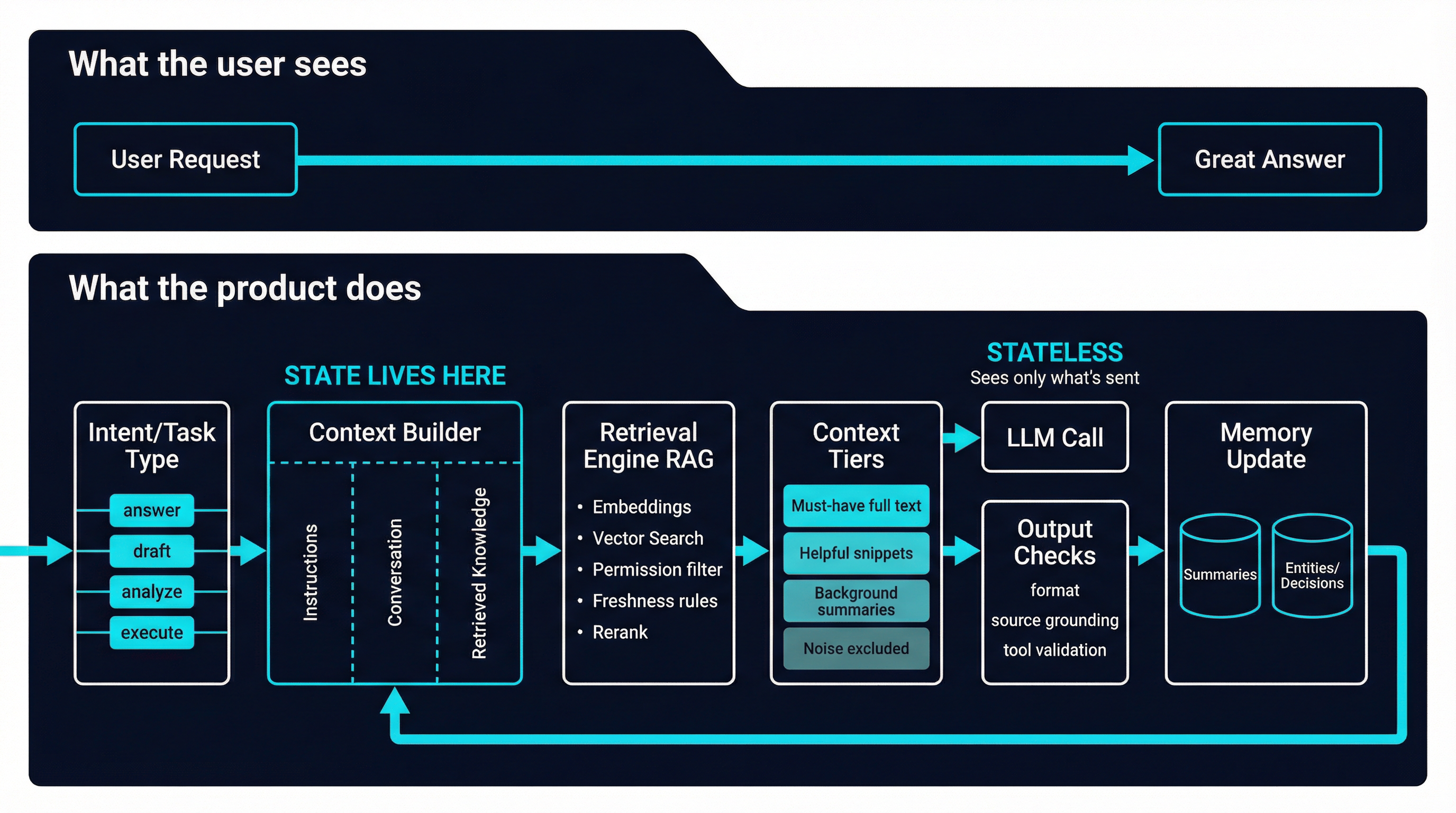
- Capture user intent
- Classify the task (answer, draft, analyze, plan, execute)
- Generate retrieval queries (often multiple)
- Retrieve candidates from knowledge stores
- Apply permission filters
- Rerank and enforce authority and freshness rules
- Assemble context by tiers (full text + summaries)
- Call the model with clear instructions and grounded sources
- Validate output (format rules, tool checks, citations when needed)
- Update memory artifacts (summaries, entities, decisions)
- Log everything for observability
This is what it means to build state around a stateless model.
8) How Syntas Architects Reliable AI-Enabled Applications
At Syntas, we treat LLMs as one component inside a broader system. The value comes from how the system is designed, integrated, and measured.
What we build for teams:
- retrieval pipelines that work across email, databases, file systems, wikis, and codebases
- creative context assembly that adapts to the task instead of relying on a static prompt
- summary layers that preserve decisions and constraints over time
- permission-aware retrieval so answers respect real access boundaries
- evaluation and observability so reliability improves every week, not only after incidents
- process augmentation that ties the model into real workflows, not just chat
What that delivers:
- faster throughput without sacrificing correctness
- fewer confident errors because answers are grounded in sources
- repeatable automation that scales across teams
- systems that can be audited, improved, and trusted
If you're building an LLM feature and it feels inconsistent, the fix is rarely "try a bigger model." The fix is usually context, retrieval, and system design.
If you want Syntas to review your current implementation and recommend a reliability-focused architecture, schedule a consultation.